We're here to help you get the most out of VBS Digital. When reporting issues, please include a link to your VBS Digital page. This will enable our technical support team to locate your account and investigate the issue.
You are viewing the VBS Digital Support Forum. For questions or feedback about Answers Bible Curriculum, visit the Answers Bible Curriculum forum.
Also, if you would like to influence the future development of VBS and it's features, please take our survey. Your feedback is much appreciated!

 Promotional Materials Usage
Hello,
We have read the terms of use for the promotional logos and clip art but I wanted to make sure we are reading it right. It states "We have provided a variety of logo options for you to use in promoting your Zoomerang VBS program. You have permission to use these logos in any way that pertains to your VBS but may not resell or redistribute the
logos to other organizations." which I take to mean we can use the logos any way we wish, however, the document later states that we cannot use any of the digital media on a website. Does this forbid us to use the logos and clip art on our website or in a live video stream?
Thanks,
Chris Elrod

Good afternoon Chris,
Happy to help you with this! No, the digital media restriction regarding website and live stream usage is limited to audio/video content. The logos and clip art, etc. are fine to use on your website or a live stream.
Please let us know if you need anything else!
Arthur
AiG Web Support

 Our registration pages do not work.
Our registration pages do not pull up. They just say find out if dinosaurs can fly.
Good afternoon Amanda,
Here are your public VBS links:
Public page: https://cbchsvvbs.myanswers.com/zoomerang/
Student registration: https://cbchsvvbs.myanswers.com/zoomerang/volunteer/
Volunteer registration: https://cbchsvvbs.myanswers.com/zoomerang/volunteer/
Please note that your registration forms will only appear on your public page if they are enabled under the Promote tab (https://myanswers.com/vbs/manage/29243/promotion/).
I confirmed that your student registration page was erroring out. There was an issue with the text on your media consent form, which I was able to resolve for you by making a few minor changes. You had too much text pasted for the consent form in a field that was meant to be used as a label. It hit the max length and cut off the rest. You can see the updates and add the missing text here: https://myanswers.com/vbs/manage/29243/forms/.
Please let us know if you have any more questions or issues!
Arthur
AiG Web Support

Good morning Lisa,
You can send your volunteers an email under People -> Send Email (https://myanswers.com/vbs/manage/28264/send-email/).
Please let us know if you have any more questions or issues!
Arthur
AiG Web Support

Contact sheet
Would you please make a contact sheet or provide thumbnails so each file does not have to be downloaded to be visible?
Good afternoon Chris,
You can download all the student details at once by selecting "Download Full Student List" under People -> Students.
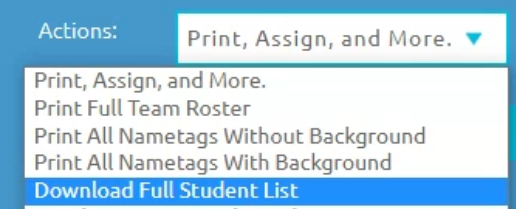
We do not currently offer preview images for the library downloads, but you can also download those en masse as .zip files from your AiG account here: https://answersingenesis.org/account/downloads/?q=Zoomerang%20VBS%3A%20Digital%20Resources
Please let us know if you have any more questions or issues!
Arthur
AiG Web Support
E-mail required field
Could you please give us the option to make e-mail addresses required on all registration forms, please?
Good afternoon Chris,
Sure, happy to help you with that! The email address fields on your registration forms are now set to required.
Please let us know if you need anything else!
Arthur
AiG Web Support

I can not view a lot of the resources when i click them it says error 403
Hello, I am having issues will the resources, like the clip art, when I try to open them a page just appears saying error 403. Can you tell me why this is happening?
Good afternoon Susy,
Error 403 when downloading our materials means that the download links expired. To pull fresh links, simply refresh the page and they should work. Please try this and let us know if you have any continuing issues!
Thanks,
Arthur
AiG Web Support

Downloading a high resolution Zoomerang logo
I would like to download a high resolution logo from the Zoomerang VBS to use on a large yard banner. Where can I find this?
Good morning J,
You can find high-res logos on the Zoomerang resources page here: https://answersingenesis.org/vbs/zoomerang/resources/. The EPS files are designed for PhotoShop/Illustrator.
Please let us know if you need anything else!
Arthur
AiG Web Support

Printing Error - Only Receiving Blank Pages
How do I print student information? Or Name Tags?
Every time I try to print, I only receive a blank page.

Craft Items
I am having trouble locating items to print off. Right now I am specifically looking for craft items..spinner space patterns, game board pattern, etc.
Good afternoon! Those are located in the Resources downloads under Crafts.
https://answersingenesis.org/account/downloads/?q=zoomerang%20vbs%3A%20digital%20resources
Also, if you have VBS Digital Pro, you can download them here: https://myanswers.com/vbs/zoomerang/resources/craft/
Please let us know if you need anything else!
Arthur
AiG Web Support
Good afternoon Lisa,
There was not a profile image for the loggerhead turtles, but I just added one! You can see it at the bottom of the list of images here (this link goes to editing your Loggerhead Turtles class): https://myanswers.com/vbs/manage/28264/teams/.
Please let us know if you need anything else!
Arthur
AiG Web Support
Customer support service by UserEcho