We're here to help you get the most out of VBS Digital. When reporting issues, please include a link to your VBS Digital page. This will enable our technical support team to locate your account and investigate the issue.
You are viewing the VBS Digital Support Forum. For questions or feedback about Answers Bible Curriculum, visit the Answers Bible Curriculum forum.
Also, if you would like to influence the future development of VBS and it's features, please take our survey. Your feedback is much appreciated!

 name tags don't match your preprinted tags
I'm trying to print the name tags from my answers vbs site but they don't line up with the preprinted tags I bought from y'all. Am I the online having this issue? Or maybe I'm missing something?
Please Help.

Hi Emily,
Yes, there is a known layout issue with printing nametags from within VBS Digital and we have a task to resolve it, though I can't provide a timeframe.
Meanwhile, you can print your own name tag labels in Word using Avery template #74459 and the preprinted VBS nametags. I'd also recommend downloading your spreadsheet to easily access the student information and copy it into Word.
Please let us know if you have any more questions or issues!
Thank you,
Arthur
AiG Website Support

Hi Donna,
You can find the promo skits file listed here: https://beta.myanswers.com/vbs/incredible-race/resources/director/miscellaneous/
I have also attached it here: incredible_race_promo_skits.rtf
Please let us know if you need anything else!
Blessings,
Arthur
AiG Web Support

Your generated database is not printing the <<address>> in my documents. Why not?
OK, glad you were able to resolve it! I believe the address column is being generated by the header form field, which is why that column comes up as blank but then all the subfields are still included.
Please let us know if you need any further assistance!
Arthur
Why does my "print all nametags without background" smaller print than the nametags package we purchased
Hi Estie,
Thanks for reporting that issue with the print nametags function. It is known and we have a task for our web designers to fix the layout there.
Meanwhile, I recommend using a word processor set to Avery template #74459 to print out your purchased name tags (https://answersingenesis.org/store/product/mystery-island-vbs-nametags/). That shouldn't present you with any formatting issues and also lets you customize exactly what goes on each nametag (custom background, text additions, subtractions, etc.)
To pull all the student info in a spreadsheet, go to your Students page and run the "Download Full Student List" action.
Please let us know if you have any further questions or issues!
Thank you,
Arthur
AiG Web Support

Where is the Day 3 Creature Feature Closing Assembly
Hi Melanie,
Here is the portion of the Assembly Guide that talks about the Closing Program:
https://myanswers.com/vbs/mystery-island/guides/assembly/closing-program/
Creature Feature short animations are located here: https://myanswers.com/vbs/mystery-island/videos/short-animations/
Creature Feature pictures are located here: https://myanswers.com/vbs/mystery-island/resources/assembly/ and here: https://myanswers.com/vbs/mystery-island/resources/presentation/animal-pals/.
Please let us know if you have any further questions or issues!
Blessings,
Arthur
AiG Web Support

name tags
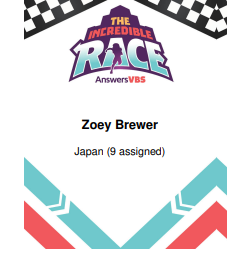
When we print the name tags the class name prints with the number of students assigned to the class ie. Peru (4 assigned) How do we get rid of the number assigned so that it looks like the sample in your video?
Hi Amy,
Unfortunately no it has not yet been fixed; we are still lacking development capacity but our team just met this past week regarding various bugs and improvements and this is on our list of things to resolve. For now, please continue to make your own custom nametags. Here are the Zoomerang resources for this year: https://answersingenesis.org/vbs/zoomerang/resources/.
Thanks,
Arthur
AiG Web Support

how can delete groups?

Hello Dianet,
No need to worry about it, because I went and deleted the duplicate groups you had that weren't like the others. If you need any further assistance with this or anything else, let us know!
Best wishes,
Tanner

where do i find the creature feature slides?
Hello,
The creature feature .jpg can be found on the page linked below (Mystery Island -> Resources -> Assembly). If you have any other questions or issues, please let us know!
https://myanswers.com/vbs/mystery-island/resources/assembly/
Best wishes,
Tanner

Emails to Volunteers and to Reset password
Emails to volunteers and other coordinators, as well as reset password emails are not being sent. I've tried each, multiple times over the course of a week and I'm still not receiving anything.

Hello Erin,
I was able to successfully add myself as a volunteer/coordinator and receive both invitation emails. Also, here is the password reset link: https://myanswers.com/account/forgot-password/. Please let us know if you have any further questions or issues!
Blessings,
Benjamin
where do I find template for door hangers and business cards to put our own info
Hello,
Happy to help! Below are links to both the door hangers and business cards for Mystery Island:
Door Hangers: https://answersingenesis.org/store/product/mystery-island-vbs-door-hangers/
Business Cards: https://answersingenesis.org/store/product/mystery-island-vbs-promotional-cards/
Please let us know if you have any further questions or issues!
Blessings,
Benjamin
Customer support service by UserEcho